Architecture
Overview
The Quad Testing Engine Orchestrator (Quad TEO) is a comprehensive testing solution designed to automate mobile application testing across various devices and platforms. It leverages powerful tools and technologies to ensure seamless integration and execution of tests, providing a robust testing environment for mobile applications.
High-Level Architecture
The high-level architecture of Quad TEO comprises several key components that work together to provide an efficient testing ecosystem:
- Mobile Devices: Various mobile devices connected via USB hubs for testing purposes.
- Dedicated USB-HUB: Connects multiple mobile devices to the testing framework.
- Quad TEO Agent: Installed locally on the testing machine, facilitating communication between mobile devices and the server.
- Quad TEO GUI: A web-based interface hosted on AWS for managing tests and viewing results.
- Cloud Infrastructure: Utilizes AWS services for scalable and flexible test management.
Components
Mobile Devices
Quad TEO supports up to 24 devices per TEO Client PC, connected through USB hubs (6 or 8 ports each).
The supported phones, OS versions and MCM modems are listed on Supported devices.
Dedicated USB-HUB
It is recommended to use a high-quality USB-HUB with an external power supply for optimal performance. USB-A to USB-C adapters may be required depending on the devices being connected.
Quad TEO Agent
The Quad TEO Agent is a local application responsible for managing connections between the mobile devices and the AWS-based Quad TEO server. Its main functions include:
- Bridge Creation: Establishes a connection between the local machine and the Quad TEO AWS server.
- Centralized Trace Server Connection: Connects to the centralized trace server to gather specific trace information.
- Automatic Device Discovery: Automatically detects new devices when connected and creates a Mobile ID on the Web UI.
- Remote Mobile Phone Control: Facilitates remote control of mobile phones via the Quad TEO UI interface.
Quad TEO GUI
The Quad TEO GUI is a server hosted on AWS, providing a web interface for managing and executing test cases. Its main functions include:
- Add and Manage Test Nodes: Facilitates the configuration and management of testing nodes.
- Add and Manage Mobile IDs: Handles the registration and management of mobile devices within the testing framework.
- Create Test Cases and Suites: Supports the creation and management of test cases and suites for organized testing.
- Run Executions and Check Results: Enables users to run tests, check results, and download reports.
High-Level Architecture
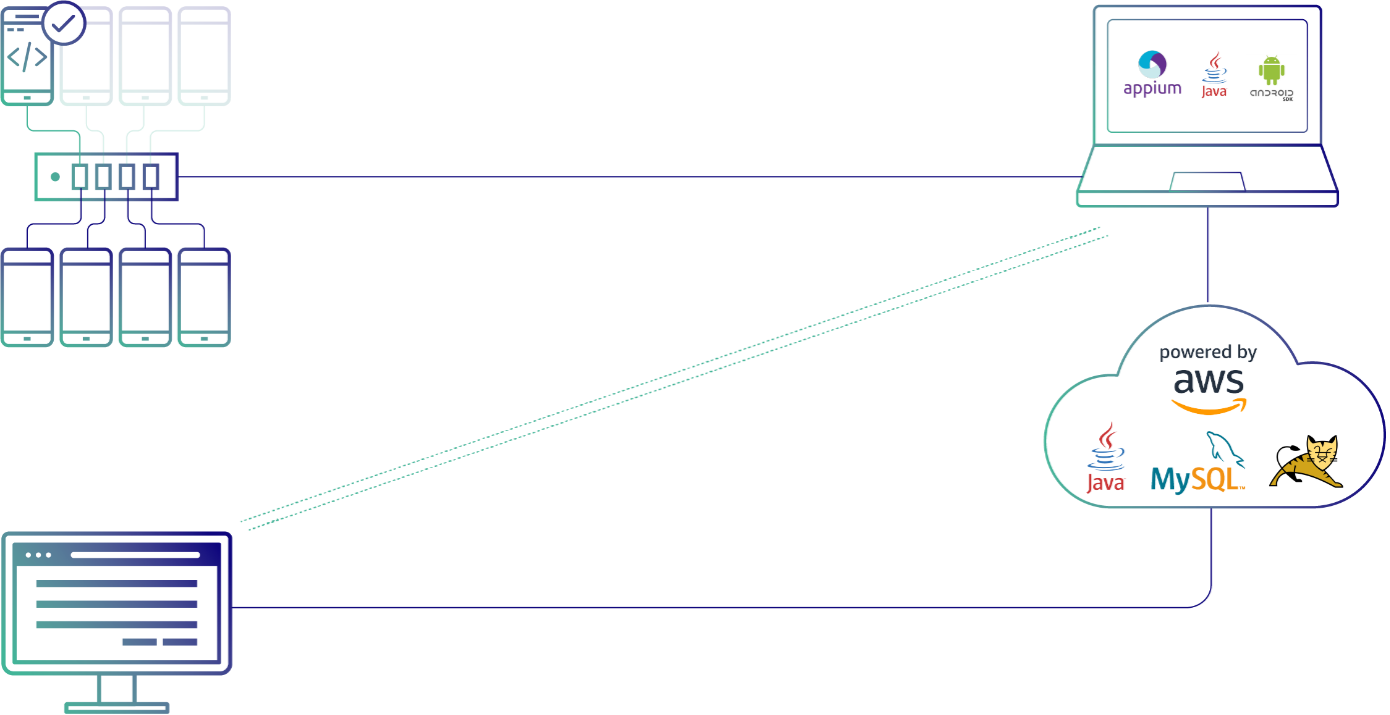
The diagram below shows how the main parts of Quad TEO work together — from the physical test devices on site to the orchestration backend running in the cloud.
How it fits together
- Test devices — Physical mobile devices (Android and iOS) are mounted on site and connected through a dedicated USB hub to the test machine. Each port maps to a device that TEO can drive automatically.
- TEO Client PC / Test Node — The on-site machine, a Mac or a Linux PC, that runs the TEO agent and its automation toolchain: Appium, the Android platform tools and, for iPhones, go-ios. The Agent Installer also adds the AWS SSM and CloudWatch agents. The node receives test instructions and executes them directly on the connected devices.
- Cloud backend — The orchestration layer, powered by AWS, built on Java, MySQL, and Tomcat. It schedules test suites, stores test cases and results, and coordinates every Test Node.
- Web UI — The browser-based interface where users design test cases, build and schedule suites, monitor executions, and review reports. It talks to the cloud backend, which in turn drives the Test Nodes.
Together, these layers let you author tests in the Web UI, run them on real devices through the Test Node, and have all results collected and analyzed centrally in the cloud.