10. Mute Device
OFF(optional)
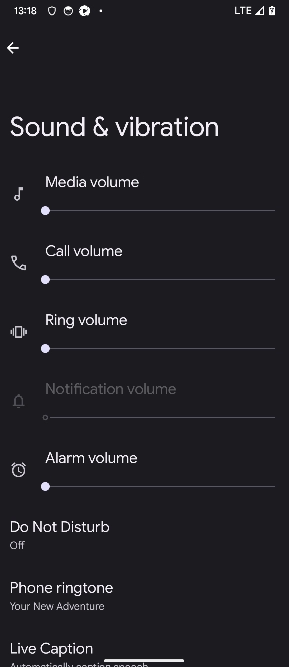
On Google Pixel devices, you can mute Ringtone, Media, and System sounds manually via the Settings menu.
Steps:
- Open the Settings app.
- Tap on Sound & vibration.
-
Choose one of the following: - Mute: To silence all sounds (ringer, system, and notifications) - Vibrate: To disable sounds but allow vibration for calls and alerts - Sound: To turn all sounds back on
-
Optionally, you can also: - Tap Volume to adjust individual sliders for:
- 🔊 Media volume
- 📞 Call (Ringtone) volume
- 🔔 Ring & notification volume
- ⏰ Alarm volume
🔇 To completely mute the device, set all volume sliders to 0 and enable Silent mode.