Agent Installer
The Agent Installer action gives you a single, ready-to-run command that installs and connects the Agent on the Test Node machine — whether it is a Mac mini or a Mini-PC. It replaces the older Download Settings action: instead of downloading a config file and configuring the machine by hand, the command takes care of all the required setup automatically.
How to use it
- Select the Test Node from the list.
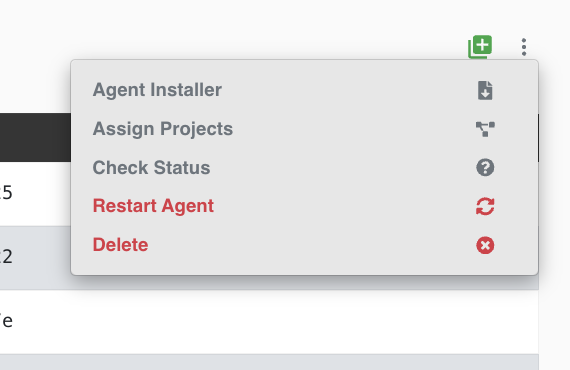
- In the top-right corner of the Test Nodes page, open the Actions (three-dot) menu.
- Click Agent Installer.
- The Agent Installation modal shows a command. Copy it and run it on the Test Node machine's terminal (Mac mini or Mini-PC).
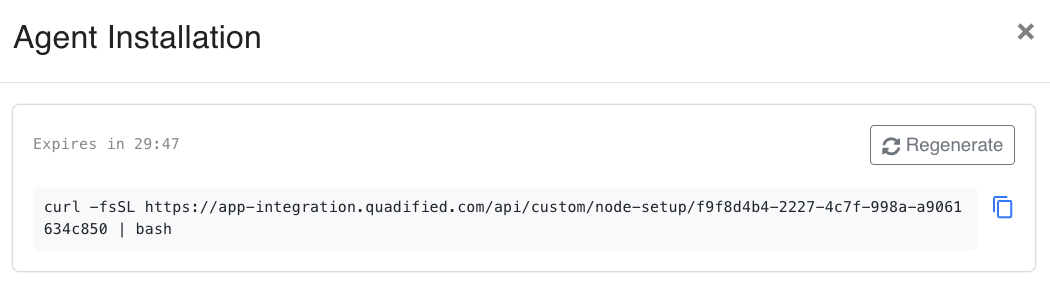
The command has the following format:
Running this command installs the Agent and applies every setting the Test Node needs to connect — no manual configuration is required.
Note
The installer token expires after the time shown in the modal (for example Expires in 29:47). If the command expires before you run it, click Regenerate to get a fresh command.
For the full client setup walkthrough, see Mac Agent Installation.