Quadified TEO Documentation
Test Case Search
Initializing search
Quadified TEO Documentation
Home
About Quadified TEO Platform
Quad TEO Components
Quad TEO Components
Overview
High-Level Architecture
Components
Components
Mobile Devices
Dedicated USB-HUB
Quad TEO Agent
Quad TEO GUI
TEO-Client PC Setup
TEO-Client PC Setup
Overview
QuadTEO Test Node Setup on MacOS
Introduction
Mac Agent Installation
Start the Agent
Phone Settings
Phone Settings
Overview
Phone Preparation
Automatic Device Discovery
Android Settings
Android Settings
Differences in Settings Between Android Devices
Samsung
Samsung
Turn Off Connections
Unlock Screen
Disable Accidental Touch Protection
Mute Device
Set Time Format to 24 Hours
Disable Software Updates
Set SMS Input Mode
Set SMS App
Prepare Chrome for Development
Set Timezone
Disable Call Forwarding Settings
Disable Screen Rotation
Enable Developer Options
Check if Developer Options is Enabled
Enable Stay Awake
Disable System Auto Update
Disable Adb Authorization Timeout
Airplane Mode
Xiaomi
Xiaomi
Turn Off Connections
Unlock Screen
Disable Accidental Touch Protection
Mute Device
Set Time Format to 24 Hours
Set SMS App
Prepare Chrome for Development
Set Timezone
Disable Call Forwarding Settings
Disable Screen Rotation
Enable Developer Options
Check if Developer Options is Enabled
Airplane Mode
Pixel
Pixel
Turn Off Connections
Unlock Screen
Mute Device
Set Time Format to 24 Hours
Set SMS App
Prepare Chrome for Development
Set Timezone
Disable Call Forwarding Settings
Disable Screen Rotation
Enable Developer Options
Check if Developer Options is Enabled
Enable Stay Awake
Disable System Auto Update
Disable Adb Authorization Timeout
Airplane Mode
Accidental Touch Protection
IOS Settings
IOS Settings
Enable Developer Mode
Check that Developer Mode is enabled
Screen Rotation
Wi-Fi – OFF
Airplane Mode
Media/Ringtone Volume/System Volume
Erase all CF settings
Messages – Required Settings for SMS/MMS Test Compatibility
Lock Screen Settings
Set Time Format to 24H
Working with Quad TEO solution
Working with the Quad TEO Web UI
Accessing the Web UI
Logging in to the Web UI
Using the TEO Web UI
Overview
Dashboard
Dashboard
Overview
Summary
Summary
Overview
Map
Running Tasks
Scheduled Suites
Test Nodes
Mobile Id's
Test Nodes Devices
Test Node Events
Statistics
Statistics
Overview
Status
Status
Overview
Up Time Cards
Mobile Battery Status
Mobile Temperature Status
Mobile Device Status
Mobile Ran Type Status
Mobile Network Status
Mobile Signal Strenght Status
Test Nodes
Test Nodes
Overview
Create a new Test Node
Check status of an existing Test Node
Actions
Actions
Download Settings
Assign Projects
Check Status
Restart Agent
Delete Test Node
Mobile ID's
Mobile ID's
Overview
Edit a Mobile ID
Add a new Mobile ID
Remote Mobile Access
Actions
Actions
Check Status
Assign Projects
Remote Mobile Acces
Create Temporary Access Token
App Management
Reboot
Prepare
Delete
Events
External Api
External Api
Overview
How to create API Configuration
How to execute an API Configuration
Trace Filter
Trace Filter
Prerequisites
Procedure
Create Trace Filter
Generating an API Key
Adding Trace Filter to a Test Case
Preparing PDML file
Test Cases
Test Cases
Overview
View existing Test Cases
Edit an existing Test Case
Create a new Test Case
Test Case Weight
Test Steps Functions
Overview
Call Group
Call Group
Make Call
Answer Call
Call Disconnect
Merge Calls
Call Forwarding
Reject Call
Call Hold
Is Ringing
Swap Call
Is Call Connected
Supplementary Services
Sms Group
Sms Group
SMS Send
SMS Receive
MMS Send
MMS Receive
Configure SMSC
Data Group
Data Group
Check Url
Speed Test
Display APN Config
Change APN Config
Audio Group
Audio Group
Start Audio Recording
Stop Audio Recording
Start Audio Play
Start Audio Play
Overview
MCM Audio Files Setup Guide
Stop Audio Play
Radio Group
Radio Group
Set Ran
Is Attached
Airplane
Check Network
Switch Network
Select Apn
Others Group
Others Group
Wait
Reboot
Comment
Take Screenshot
Api Call
Miscellaneous Group
Miscellaneous Group
Wifi
Data Roaming
Show Caller Id
Mobile Data
Check Ip
SIM Group
SIM Group
Add Temp E-Sim
Delete Temp E-Sim
Actions Dropdowns
Actions Dropdowns
History
Assign Projects
Export
Import Test Case from JSON file (duplicate Test Case)
Delete a Test Case
Filter
Filter
Text
Tag
Mobile Id Search
Disabled
Trace Enabbled
Test Suites
Test Suites
Overview
Create a Test Suite
Schedule a Test Suite
Edit a Test Suite
Actions Dropdowns
Actions Dropdowns
History
Assign Projects
Run
Stop
Delete
Filter
Filter
Text
Tag
Test Case Search
Status
Executions
Executions
Overview
Current Status
Actions On Running Test Suite
Show Logs
Download PDF Report
Re-run Failed Test Cases
Users
Users
Overview
User Roles
Add New User
Delete User
Settings
Settings
Overview
Temporary Access Tokens
Change User Password
API Key Generator
About
Sign Out
Troubleshooting
Grafana
Grafana
Overview
Using Prometheus Metrics in Grafana Dashboards
Using the Grafana
API
API
API Overview
Curl Commands
Agent Config
Change Log
Test Executions
Tokens
Trace Filters
API Clients
Projects
Test Suites
Test Cases
Test Nodes
Users API
Function Params
Device Models
Mobile Devices
Home
Using the TEO Web UI
Test Suites
Filter
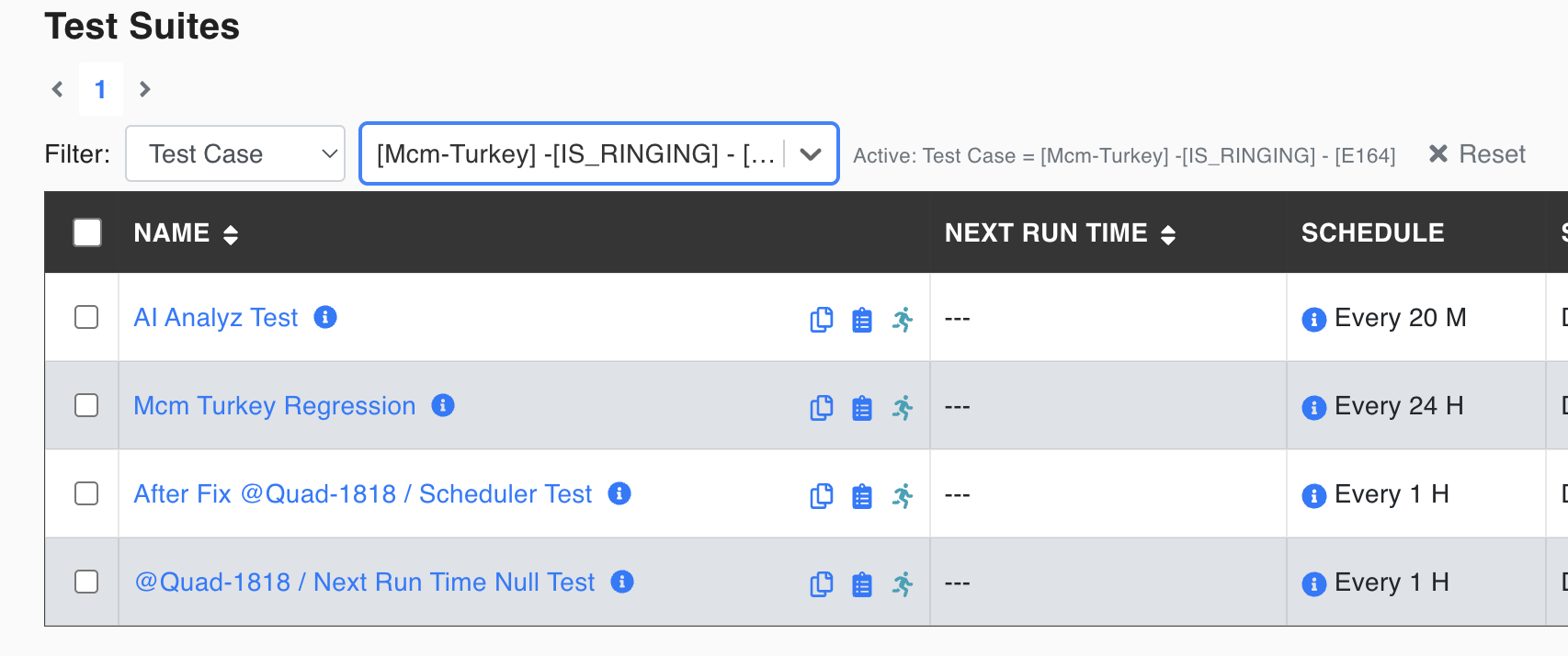
Test Case Search
The test suites to which the selected test case has been assigned will be listed.
Back to top