Schedule
This section is used to configure when a Test Suite will start and (optionally) how it will repeat. If you want the suite to run as a recurring task, turn Repeating on and configure the interval, time window, and days.
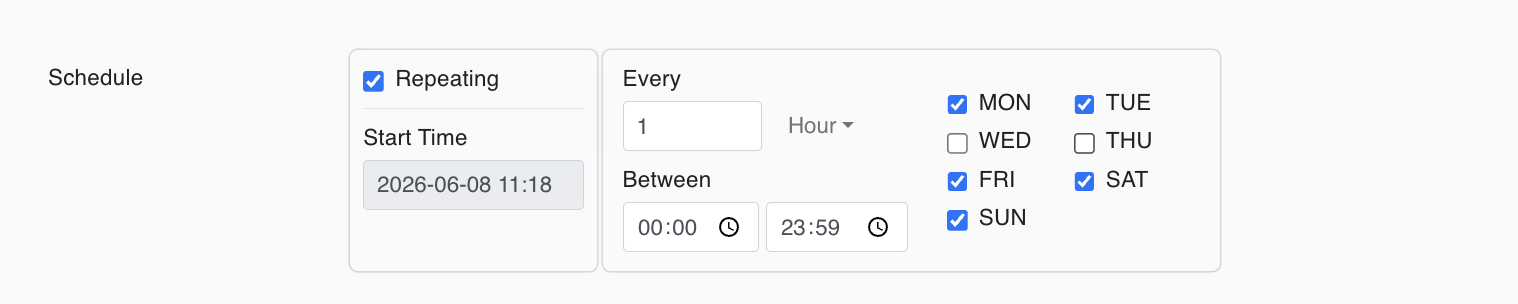
Fields
Repeating
- Off: The suite runs once at the selected Start Time.
- On: The suite runs repeatedly based on the rules below.
When Repeating is off, the Every / Between / Days fields are disabled.
Start Time
- The date and time when the suite will run for the first time.
- Pick the date/time using the date-time selector (e.g.
2026-06-08 11:18).
Every (Repeat Frequency)
Visible/enabled when Repeating is on.
- Number: The interval value (e.g.,
1,2,6). - Unit:
MinutesorHours.
Examples:
- Every: 15 Minutes → runs every 15 minutes
- Every: 1 Hour → runs every 1 hour
Between (Time Window)
Visible/enabled when Repeating is on.
- Defines the allowed time range during the day.
- Two time pickers:
- Start (e.g.,
00:00) - End (e.g.,
23:59)
- Start (e.g.,
Days
Visible/enabled when Repeating is on.
- Select which days of the week the suite can run:
MON, TUE, WED, THU, FRI, SAT, SUN - Days are selected using checkboxes.
Usage Scenarios
1) Run once
- Repeating: Off
- Start Time: Desired date/time
2) Repeat daily within a time window
- Repeating: On
- Every: e.g.
1 Hour - Between: e.g.
00:00 – 23:59(all day) or09:00 – 18:00(business hours) - Days: desired days (e.g., all days or weekdays)
3) Repeat only on specific days
- Repeating: On
- Every: e.g.
15 Minutes - Between: e.g.
09:00 – 18:00 - Days: e.g.
MON, WED, FRI
Note: Make sure the Deactivated toggle is not set to True. If a Test Suite is deactivated, the scheduler will not run it.