AI Analyzer — Automatic Failure Analysis
When a Test Suite's success rate drops between executions, the AI Analyzer helps you understand what went wrong. It investigates the failed run, explains the likely root cause in plain language, and often suggests how to fix it.
The AI icon on the Executions page
When a suite's success rate drops between executions (for example, from 100% down to 0%), an AI icon appears next to the affected execution on the Executions page, marking the run where the regression happened.

Running an analysis
Click the icon and the AI Analyzer automatically investigates why the drop occurred. It reviews the failed steps and recent run history, then explains the likely root cause in plain language — and often suggests how to fix it.
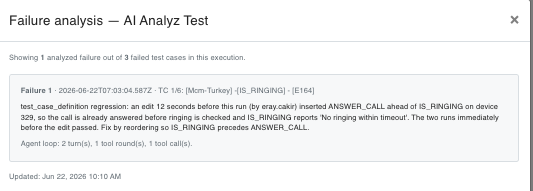
What it analyzes
- Failed step details
- Recent run history
- Configuration or test-case changes made shortly before the run
Note
The AI icon only appears when a measurable drop in success rate is detected between executions, so it points you directly to the run where the regression began.