How to Execute an API Configuration
After creating an API Configuration, we need to select it while adding a Test Step in a Test Case. To do that, please follow the steps below:
-
Navigate to the Test Cases Tab: - Open the QuadATF Dashboard menu and go to the Test Cases tab.
-
Add a New Test Case: - Click on the + sign on the top-right of the page to add a new Test Case.
-
Fill in Required Fields: - After filling in the required fields and selecting a mobile ID to be used in the test steps, click on the Add Steps button.
-
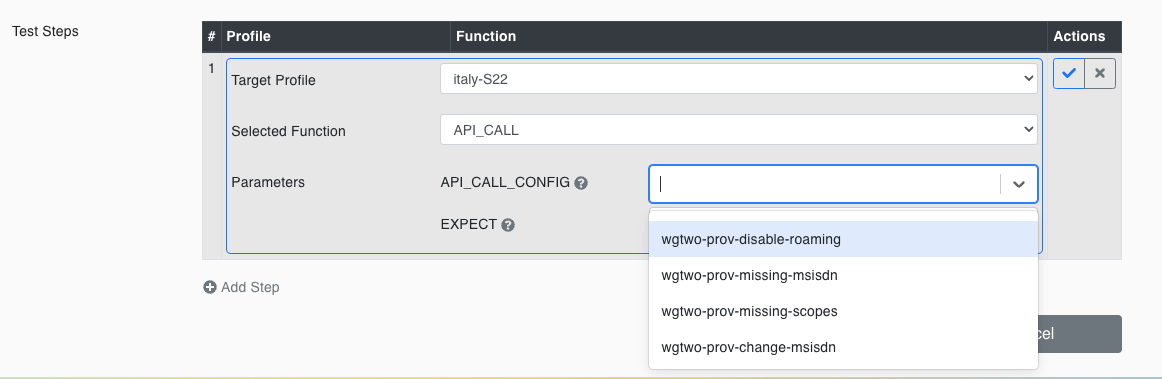
Select API_CALL Function: - Choose the
API_CALLfunction from the dropdown menu.
-
Select API Configuration: - Choose the API Configuration to be executed from the
API_CALL_CONFIGparameter dropdown. -
Save and Execute: - Save the Test Case, add it to a Test Suite, and execute the test suite.
-
Review Execution Results: - After executing the Test Suite, the test step execution result will be FAIL or SUCCESS based on the selected
EXPECTparameter and the response result of the API Request. See the following examples:
a. EXPECT: SUCCESS and API Response: No Error

b. EXPECT: SUCCESS and API Response: Error

c. EXPECT: FAIL and API Response: Error
