Manage users
Add New User
To add a new user to the system, follow these steps:
-
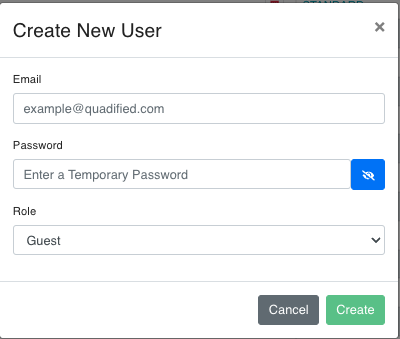
New User: Navigate to the Users page and click the New User icon (person with a plus) at the top right of the page. This will open the "Create New User" dialog.
-
Fill in the user details: In the "Create New User" dialog, you will need to provide the following information:
- Email: Enter the email address of the new user.
- Password: Enter a temporary password for the new user (Enter a Temporary Password). It needs at least 8 characters with a number, a lowercase letter, an uppercase letter and a special character. You can click the eye icon to toggle visibility of the password.
- Role: Select the role for the new user from the dropdown menu. The available roles are:
- Guest
- Standard
- Admin
-
Save the new user: Once all the details are filled in, click the "Create" button to add the new user to the system. "New user added!" confirms it. If you want to cancel the operation, click the "Cancel" button.
Edit User Role
Click a user's e-mail address in the list to open Edit User, choose the new Role (Guest, Standard or Admin) and save. "User edited:
Delete User 
To delete users from the system, follow these steps:
-
Tick the users: On the Users page, tick the checkbox of each user you want to delete.
-
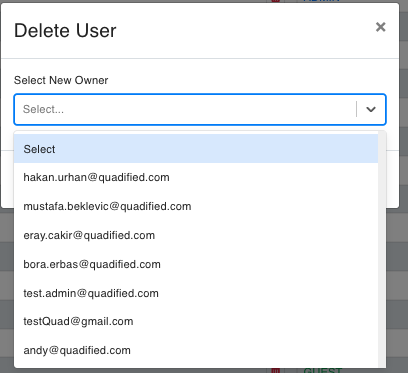
Click Delete Users: Click the trash icon (Delete Users) at the top right. This opens the Delete User(s) dialog.
-
Select New Owner: Choose the user who takes over the Test Cases, Test Suites and other items the deleted users created. The list offers users with an eligible role:
- For a deleted Admin: Admin users.
- For a deleted Standard user: Standard and Admin users.
- The new owner must always be a Standard or Admin user.
-
Confirm the deletion: Click Delete (enabled once a new owner is selected). If you want to cancel the operation, click the "Cancel" button.
These rules ensure that the ownership and responsibilities of entities are appropriately managed within the system.