Edit an existing Test Case
To edit an existing Test Case, click on the name of the Test Case. The Edit Window will open upon execution:
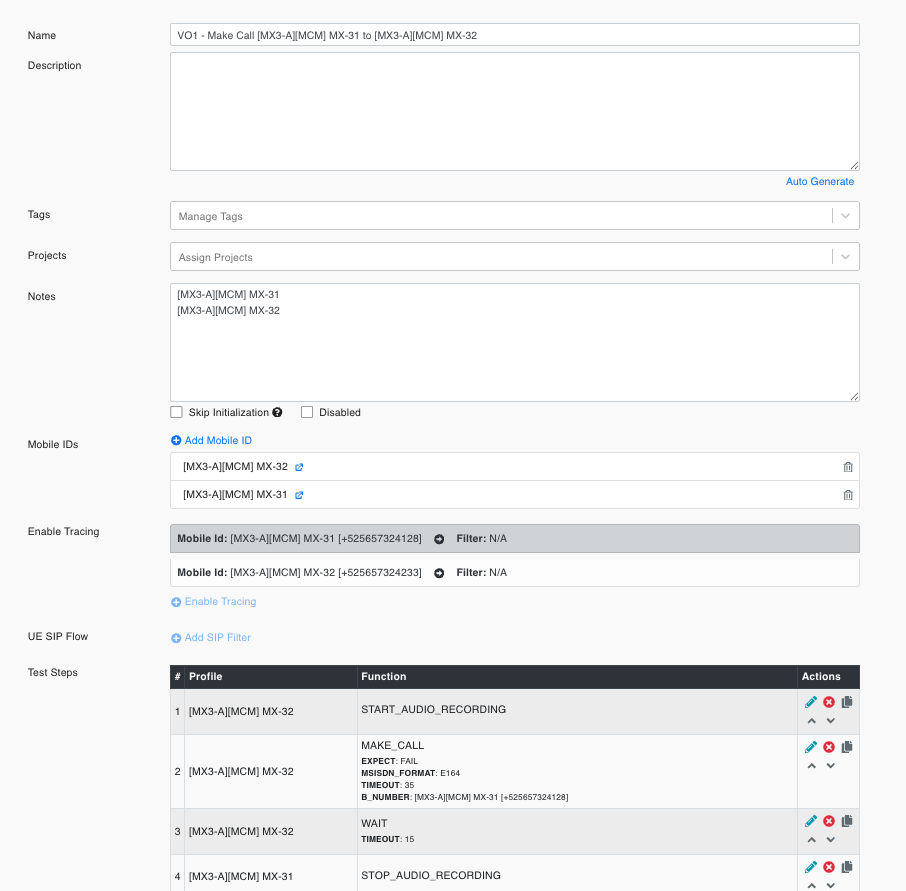
Parameters
| Parameter | Description |
|---|---|
| Name | The name of the test case. |
| Description | A brief description of the test case. |
| Tags | Tags associated with the test case for categorization. |
| Projects | Projects to which the test case is linked. |
| Notes | Additional notes or comments about the test case. |
| Disabled | Indicates whether the test case is disabled. |
| Disable Reason | The reason for disabling the test case. |
| Skip Initialization | Skips the device initialization step when the test case is started as a Direct Run. |
| Mobile IDs | The mobile devices associated with the test case. |
| Trace Filters | Filters applied to trace logs for the test case. |
| UE SIP Flow | Details of the SIP conditions and actions for the test case. |
| Test Steps | Steps involved in the test case, including profile and function details. |
Skip Initialization
From a test case's detail page you can enable or disable Skip Initialization.
Note
This setting applies only to Direct Run executions (running a test case directly, without a test suite). It has no effect on test cases that are run as part of a test suite.
How to use it:
- Open the test case and go to its detail page.
- Toggle the Skip Initialization checkbox to enable or disable it.
- Click Save.
The Skip Initialization checkbox is shown in the test case detail window above.
See also Direct Run.