Delete Test Case
The Delete Test Case feature allows you to remove a test case from your system. This is useful for managing and cleaning up your test case repository.
How to Use the Delete Feature
To delete a test case, follow these steps:
- Select the Test Case to Delete: Choose the test case that you want to delete from your list.
- Open the Action Dropdown: Click on the Action dropdown menu.
- Select "Delete": Choose the "Delete" option from the dropdown.

Handling Test Case in Test Suites
If the test case you are trying to delete is part of a test suite, it cannot be deleted. Instead, a pop-up message will appear, informing you that the test case is part of a test suite and cannot be removed.
Example Pop-up
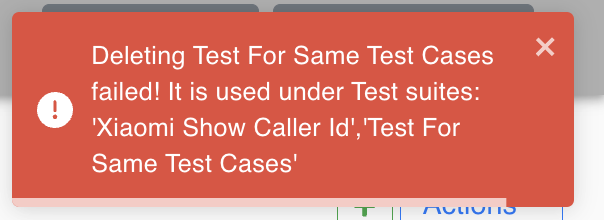
This pop-up ensures that you do not accidentally delete test cases that are actively being used in test suites, maintaining the integrity of your test plans.