Direct Run
You can now run a single test case directly from the Test Cases page, without first adding it to a test suite. This makes it much faster to validate or re-run an individual test case.
How to use it
- Go to the Test Cases page.
- Select the test case you want to run by checking its checkbox.
- Open the Actions dropdown (top-right menu) and click Run.
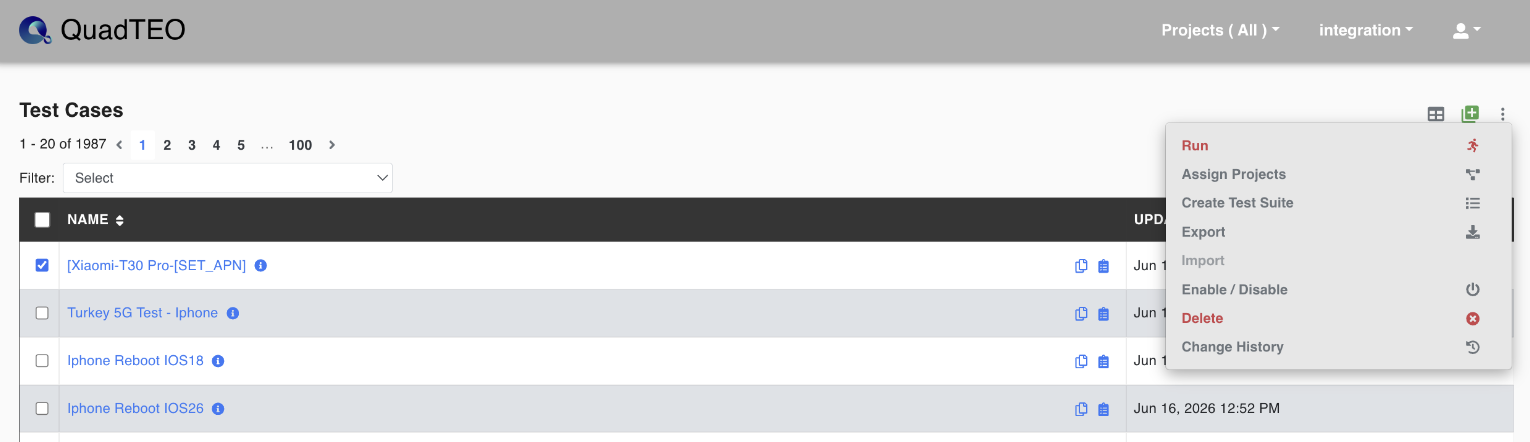
- A confirmation dialog appears. Click Run to start the test case immediately.
- Once started, you'll see a confirmation message with a direct link to view the execution.
Viewing a Direct Run
Test cases started this way appear on the Executions page tagged as Direct run, so you can easily tell them apart from suite-based runs and follow their progress.

Note
See also Run a Test Case via API and Run History.