Creating a Trace Filter
In order to create a Trace Filter, we should follow the steps below:
- Go to the Trace Filters tab from the TEO UI.
- Click on the “+” sign on the right upper side of the window to create a new filter.
- Enter the name of the filter.
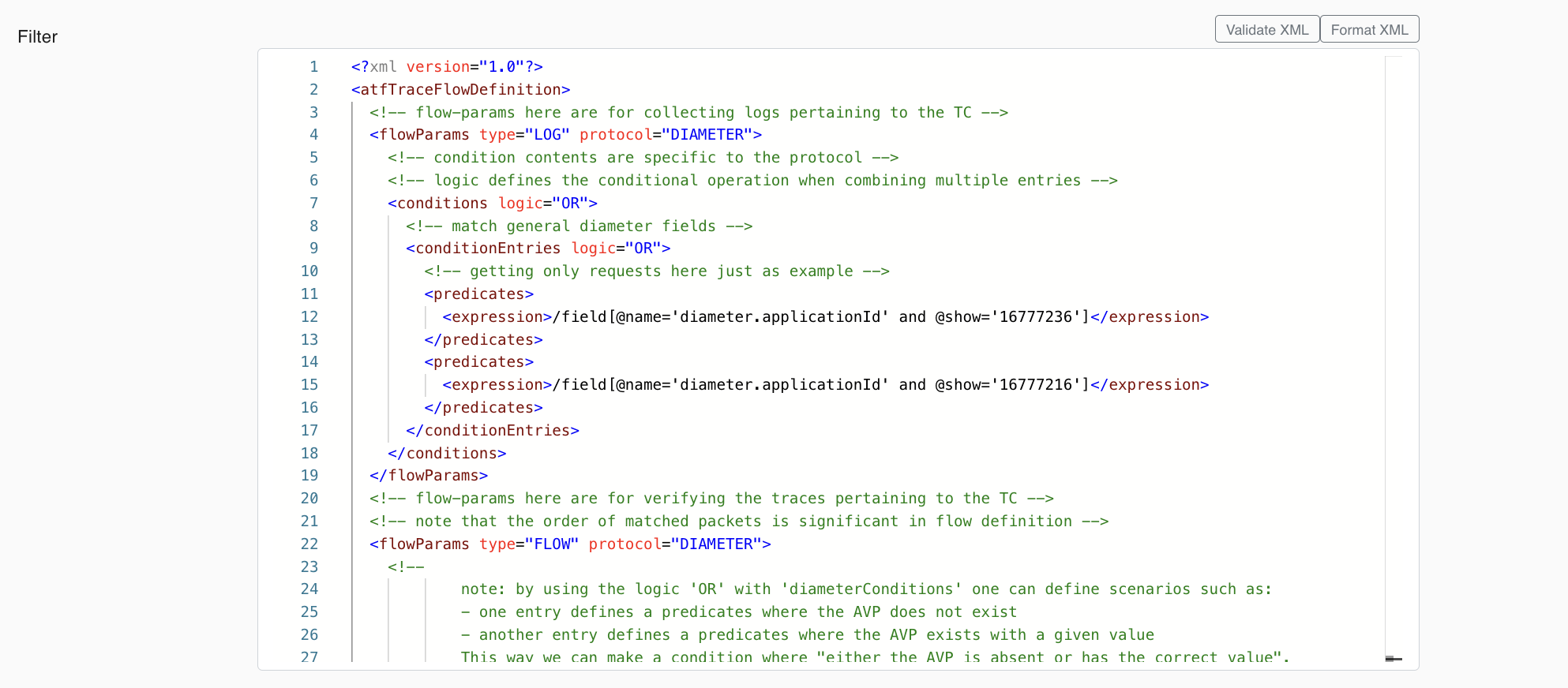
- Enter the filter content in XML format.
Preparing XML
To prepare an XML for Trace Filter, let’s understand the template first.
There are two types of params “LOG” and “FLOW“.
-
The conditions in LOG type are to filter the trace, put the results into a file, and attach the file to the test case execution. This file can be downloadable from the Test Case Execution Result page.
-
The conditions in FLOW type are to filter the trace and show the matched logs in the Trace Logs. The matched logs are displayed on the Test Case Execution Result → Trace Logs page.
IMPORTANT NOTE: The FLOW type is for specifying the expected flow/sequence of messages. That’s why the FLOW type of conditions determine the Test Case success/failure, based on whether the traces for the Test Case matches/contains the given flow or not. So if the trace pdml does not satisfy the given flow/sequence, then Test Case is marked as "FAILED". The LOG type of conditions does not affect on the Test Case success/failure.
In XML, variables can be used as well. There are two types of variables:
- Predefined variables:
${ATF_IMSI}→ IMSI value of the device-
${ATF_MSISDN}→ MSISDN value of the device -
User-defined variables → variables for dynamic values.
- The user-defined variables can be defined using the
<atfFunction type="variable">tag as can be seen in the below XML template. The name of the variable is set using thesetvartag. For example<setvar>sessionId</setvar>. This user-defined variable can be used in the further predicates with the following format{ATF_VAR_varname}. For our example this will be as follows:{ATF_VAR_sessionId}.
XML Trace Filter
The following code snippet contains a Trace Filter XML template:
<?xml version="1.0"?>
<atfTraceFlowDefinition>
    <flowParams type="LOG">
        <conditions logic="AND" protocol="SIP">
            <conditionEntries logic="AND">
                <predicates>
                    <expression>//field[@name='sip.Via.transport' and @show='TCP']</expression>
                </predicates>
            </conditionEntries>
        </conditions>
        <conditions logic="AND" protocol="DIAMETER">
            <conditionEntries logic="AND">
                <predicates>
                    <expression>/field[@name='diameter.applicationId' and @show='1234567']</expression>
                </predicates>
            </conditionEntries>
        </conditions>
    </flowParams>

    <flowParams type="FLOW">
        <conditions logic="AND" protocol="DIAMETER">
            <atfFunction type="variable">
                <predicates>
                    <expression>//field[@name='diameter.Session-Id']</expression>
                </predicates>
                <fieldvalue>@show</fieldvalue>
                <setvar>sessionId</setvar>
            </atfFunction>

            <conditionEntries logic="AND">
                <predicates>
                    <expression>//field[@name='diameter.flags.request' and @show='1']</expression>
                </predicates>

                <predicates>
                    <expression>//field[@name='diameter.CC-Request-Type' and @show='1']</expression>
                </predicates>

                <predicates>
                    <expression>//field[@name='diameter.Called-Station-Id' and @show='ims']</expression>
                </predicates>
            </conditionEntries>
        </conditions>

        <conditions logic="AND" protocol="DIAMETER">
            <conditionEntries logic="AND">
                <predicates>
                    <expression>//field[@name='diameter.flags.request' and @show='0']</expression>
                </predicates>

                <predicates>
                    <expression>//field[@name='diameter.Session-Id' and @show='${ATF_VAR_sessionId}']</expression>
                </predicates>

                <predicates>
                    <expression>//field[@name='diameter.Result-Code' and @show='2001']</expression>
                </predicates>
            </conditionEntries>
        </conditions>

        <conditions logic="AND" protocol="SIP">
            <atfFunction type="variable">
                <predicates>
                    <expression>//field[@name='sip.Call-ID']</expression>
                </predicates>
                <fieldvalue>@show</fieldvalue>
                <setvar>callId</setvar>
            </atfFunction>

            <conditionEntries logic="AND">
                <predicates>
                    <expression>//field[@name='sip.Method' and @show='REGISTER']</expression>
                </predicates>

                <predicates>
                    <expression>//field[@name='sip.from.user' and @show='${ATF_IMSI}']</expression>
                </predicates>

                <predicates>
                    <expression>//field[@name='sip.Expires' and @show='600000']</expression>
                </predicates>
            </conditionEntries>
        </conditions>

        <conditions logic="AND" protocol="SIP">
            <conditionEntries logic="AND">
                <predicates>
                    <expression>//field[@name='sip.Status-Code' and @show='401']</expression>
                </predicates>
                <predicates>
                    <expression>//field[@name='sip.Call-ID' and @show='${ATF_VAR_callId}']</expression>
                </predicates>
            </conditionEntries>
        </conditions>

    </flowParams>
</atfTraceFlowDefinition>
Let's check each of the components of the template XML above. In this XML:
- We have two conditions with one predicate for each condition for the LOG type.
- The first condition is for SIP protocol and checks whether the SIP transfer protocol is “TCP” or not.
- The second condition is for DIAMETER protocol and checks whether the DIAMETER application id is
1234567or not. -
All the logs that meet these conditions will be added to the file to be attached to the Test Case Execution Result.
-
We have four conditions for the FLOW type.
- The first condition is for DIAMETER protocol and contains one user-defined variable and three predicates. The name of the user-defined variable is
<setvar>sessionId</setvar>. - The second condition is also for DIAMETER protocol and contains three predicates. The second predicate uses a user-defined variable which is defined in the first condition above '
{ATF_VAR_sessionId}'. - The third condition is for SIP protocol and contains one user-defined variable and three predicates. The name of the user-defined variable is
<setvar>callId</setvar>. The second predicate of the condition uses a predefined IMSI variable '${ATF_IMSI}'. - The fourth condition is also for SIP protocol and contains two predicates. The second predicate uses the user-defined variable which was defined in the third condition above '
${ATF_VAR_callId}'. - All the logs that meet these conditions will be displayed in the Trace Logs of the Test Case Execution Result.
NOTE: That the condition logic is “AND“. This means that all predicates should be met for a log. It is also possible to use “OR“ logic for the conditions and predicates.
NOTE: It is possible to add multiple conditions with multiple predicates.
Once the XML is ready, it is possible to validate and format it while creating the Trace Filter as below:
Below is an example screenshot.