Delete User
To delete a user from the system, follow these steps:
-
Click the trash icon: Navigate to the Users page and click on the trash icon next to the user you want to delete. This will open the "Delete User" dialog.
-
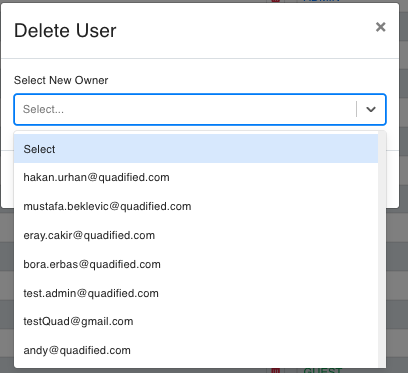
Select New Owner: In the "Delete User" dialog, you will need to select a new owner for the entities created by the user being deleted. The dropdown menu will list eligible users based on the hierarchy rules:
- Admin: Admin users can only transfer ownership to other admin users.
- Standard: Standard users can transfer ownership to both standard and admin users.
- Guest: Guest users can transfer ownership to any user (guest, standard, or admin).
-
Confirm the deletion: Once you have selected the new owner, confirm the deletion by clicking the appropriate button. If you want to cancel the operation, click the "Cancel" button.
Hierarchy Rules for Transferring Ownership
- Admin to Admin: Admin users can only transfer their entities to other admin users.
- Standard to Standard/Admin: Standard users can transfer their entities to both standard and admin users.
- Guest to Any: Guest users can transfer their entities to any user, regardless of role.
These rules ensure that the ownership and responsibilities of entities are appropriately managed within the system.
This page provides a detailed guide on how to delete a user and transfer their created entities to another user following the hierarchy rules.